
Turning a Podcast Episode on YouTube into Show Notes
September 8, 2026 · 7 min read
Show notes are the part of podcasting nobody got into podcasting for. They are also the part that search engines, guests, and skimmers read. If the episode is on YouTube, the transcript turns them into a forty-minute job instead of a second listen, and the notes come out with timestamps that link back into the episode.
Get the transcript with timestamps on
Paste the episode link on LinkTranscript. Leave the Timestamps toggle on; the point of show notes is that each item points to a moment. If your episode has uploaded captions (you or your editor added an SRT), the transcript will have punctuation and correct names. If it only has YouTube's automatic captions, expect the guest's name and any product names to be misspelled. Fix those as you go, and consider uploading corrected captions afterward, since that fixes the problem for every tool downstream.
A ninety-minute episode is about 13,000 words. Do not read it top to bottom. Work through the three passes below.
Pass one: chapters from topic shifts
Chapters are the spine of the notes and, on YouTube, they become the segmented progress bar under the video. Find the shifts by searching the transcript for the phrases hosts use when they turn a corner: "let's talk about," "moving on," "the other thing," "before we wrap," "so tell me about." Each hit is a candidate chapter start. Add the guest's introduction, the first real question, and the closing, and you usually have eight to twelve.
For each one, click the timestamp to confirm it is a real shift and not a false alarm, then write a chapter title of five words or fewer that says what the segment is about. "Why he left Google" beats "Career discussion."
YouTube's rules for chapters to show up as segments on the progress bar: the list goes in the description, the first timestamp must be 0:00, there must be at least three, they must be in ascending order, and each chapter has to be at least ten seconds long.
One check before you move on: play the first ten seconds of each chapter from its timestamp. A chapter that starts mid-sentence reads badly on the progress bar, and nudging the time back five seconds to the start of the host's question costs nothing now and is annoying to fix after the description is published.
Pass two: three quotes
Every episode has three lines worth pulling: the one that would make someone click, the one that summarizes the guest's position, and the one that is funny or surprising. Search for them the way you would search for any moment in a long video: by an ordinary word you remember from the line, since names and numbers are where automatic captions go wrong.
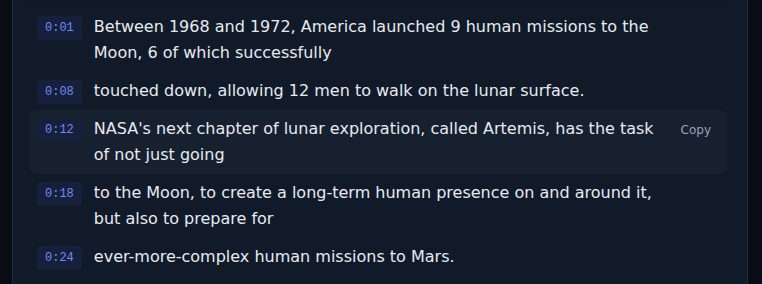
When you find the line, hover over it on the transcript page and use the copy control to take that single line with its timestamp. Trim filler ("um," "you know," "like") but change no words; a quote in show notes is a quote. Put the timestamp after it in the notes so a reader can hear it in context.
Pass three: the links list
Listeners come to the notes for the things the guest mentioned. Search the transcript for "dot com," "book," "called," "check out," "website," and "link," and read the hits. Each one is a resource to find and link. Also search the guest's first name; the spots where the host says it are usually where the guest's project or handle comes up. Put the guest's links first, then the books and tools in the order they came up, each with the timestamp of the mention.
A template
Paste this into the description or your notes page and fill it in:
[Guest name] on [the one-line hook of the episode].

In this episode:
0:00 Intro
[m:ss] [Chapter title]
[m:ss] [Chapter title]

Three moments:
"[Quote one]" ([m:ss])
"[Quote two]" ([m:ss])
"[Quote three]" ([m:ss])

Mentioned:
[Guest's site or handle]
[Book, tool, or link] ([m:ss])

Full transcript: [link]
The chapter list has to stay in the YouTube description for the segments to appear; the rest can live wherever your notes live.
Where an assistant fits
If you want a first draft of the summary paragraph, the Prompts menu under the search box has a Summary entry and a Key Takeaways entry; either copies a prompt with the whole transcript attached, ready to paste into ChatGPT, Claude, or Gemini. Use the output for the paragraph at the top, then check every name and number against the transcript before publishing, because assistants smooth over exactly the errors that automatic captions introduce. Chapters and quotes are faster by hand with search than by asking; the timestamps are already there.
If a guest is involved, send them the three quotes and the links list before the notes go live. It takes them two minutes, it catches the misspelled company name that the captions introduced and you missed, and guests who see their words handled carefully share the episode.
Publishing the transcript itself
Some shows post the full transcript alongside the notes, which helps deaf and hard-of-hearing listeners and gives search engines the whole episode. Export as Markdown from LinkTranscript (the Export menu, then MD) and you get a file with the title, source link, language, and date at the top and the transcript below with timestamps. Add the speaker labels, since captions do not carry them, and fix the names. If the episode is yours, that is all the permission you need. If you are writing notes for someone else's show, link to the episode and keep the transcript private unless they say otherwise.
A time budget
For a ninety-minute episode: five minutes to get the transcript and check the track, fifteen minutes for chapters, ten for quotes, ten for links and the summary paragraph, and five to paste into the template and check the timestamps. Forty-five minutes, none of it spent listening to the episode again.
Try it on a video
Paste a YouTube link and get a clean, exportable transcript in seconds.