
Studying from Recorded Lectures: A Transcript Workflow That Beats 2x Speed
September 8, 2026 · 7 min read
Recorded lectures made one thing worse: it became possible to watch a lecture three times and still not know it. Playback speed went up, retention did not. The reason is that watching is passive, and speeding it up makes it more passive, not less. Reading a transcript is active by accident, because you cannot read without deciding what each sentence means, and it opens the door to the two things that do build memory: rewriting and self-testing.
This is the workflow I would hand a first-year student. It takes about forty-five minutes for a fifty-minute lecture the first time and gets faster.
Pass one: read it, do not watch it (15 minutes)
Paste the lecture link on LinkTranscript, turn the Timestamps toggle off, and read the transcript top to bottom. A fifty-minute lecture is roughly 7,000 words, a fifteen-minute read at a normal pace. Do not take notes yet. You are reading for shape: where the lecturer defines a term, where they work an example, where they say "the key point here is" or "this will be on the exam," where the topic changes.
When you hit a passage you know you will need, highlight it and click Copy selected text, and paste it into a scratch document with a one-word label. You will end pass one with five to ten passages and a rough sense of the lecture's three or four sections.
If the transcript is auto-generated (no punctuation, lowercase), this pass is a little slower and the names and numbers are less reliable. Anything you plan to memorize, click the timestamp and listen to once. Uploaded captions can be read as-is.
Pass two: export and cut it down (15 minutes)
Export the transcript as Markdown. It opens in Obsidian, Notion, Logseq, or any editor with the lecture title as a heading and the video link underneath, so you can always get back to the source. Now edit. Delete the housekeeping at the start and end. Delete the digressions. Turn the lecturer's examples into one-line versions in your own words. Add a heading for each of the sections you noticed in pass one. Leave timestamps on only the lines you might want to rewatch (a derivation, a demonstration, a passage you did not follow).
You are aiming for a document about a quarter the length of the transcript. The cutting is the studying; deciding what to keep forces you to judge what matters, and rewriting an example in your own words is the first time you have actually used the idea.
Pass three: turn it into questions (15 minutes)
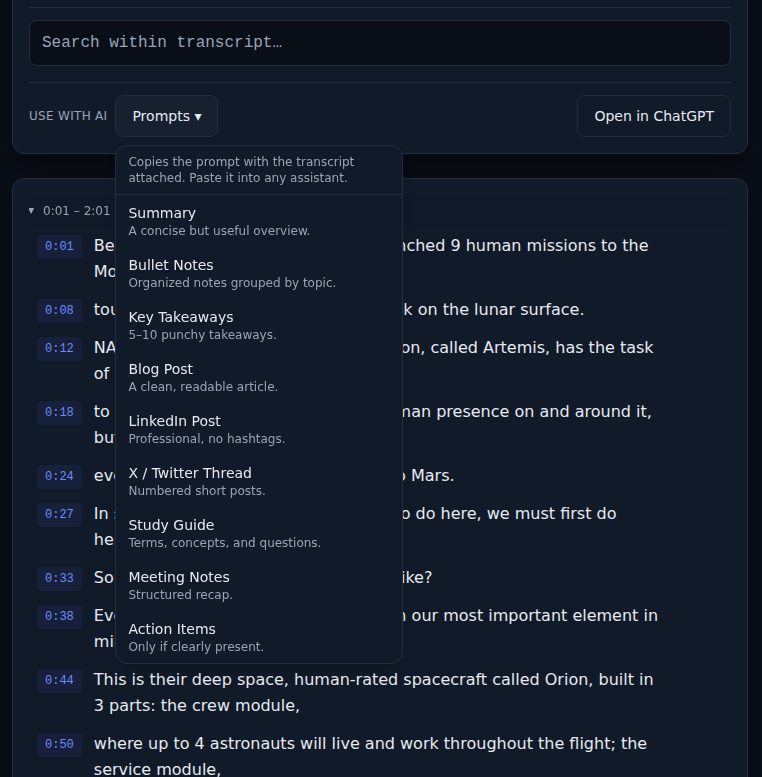
On the transcript page, open the Prompts menu and pick Study Guide. It copies the transcript with a prompt that asks for three sections: key terms with one-line definitions, core concepts, and open-ended review questions. Paste it into ChatGPT, Claude, or Gemini. If you would rather use your cut-down notes than the raw transcript, paste those instead; the questions will be sharper because the noise is gone.
Then close the notes and answer the review questions from memory, in writing, in a couple of sentences each. Mark each answer right, partly right, or wrong. The wrong ones are the lecture's real content for you, and the timestamps in your notes tell you exactly where to go back. Do not skip the writing-it-down part; answering in your head feels like recall and is mostly recognition.
A week's schedule for a lecture course
- Same day as the lecture: passes one and two. The transcript is fresh and the cutting goes fast.
- Two days later: pass three, the review questions, from memory. Fix the notes where you were wrong.
- One week later: re-answer only the questions you got wrong or partly right. Most will now be right; the rest are your exam list.
- Before the exam: read the cut-down notes for every lecture in one sitting. At a quarter of the transcript length, a semester of lectures is an afternoon.
Studying with others
The method scales to a study group without anyone sharing the raw transcript. Each person does passes one and two alone, then the group compares cut-down notes, which surfaces the parts one person thought mattered and another cut. Pool the review questions, drop duplicates, and answer the combined set from memory before the next meeting. Disagreements about what the lecturer said are settled in seconds: search the transcript, click the timestamp, listen.
Note-app setup
One folder per course, one Markdown file per lecture, named with the lecture number first ("07 Enzyme kinetics.md") so they sort. Every file starts with the video link the export put there. In Obsidian or Logseq, search across the folder finds any term in any lecture; in Notion, a database with one page per lecture does the same. Keep the questions and your scored answers at the bottom of each file. By the end of the course you have a searchable, self-tested version of every lecture, and you never had to watch one twice.
When there is no transcript
Some lecture capture systems upload to YouTube with captions off, and some lecturers turn them off. If LinkTranscript reports no captions, ask the course staff to enable them; it is a checkbox in YouTube Studio and it helps every student with a hearing impairment as well as everyone who studies this way. In the meantime, the guide on what to do when a video has no transcript lists the alternatives.
Try it on a video
Paste a YouTube link and get a clean, exportable transcript in seconds.