
Building a Searchable Archive of a Channel's Talks, One Video at a Time
September 9, 2026 · 7 min read
A lecture series, a channel you have followed for years, a conference that posts every talk: at some point you want to ask "where did they explain X?" and get an answer across all of it, not one video. YouTube's search will not look inside the content for you. A folder of transcript files will. Here is a setup that works.
The workflow, per video
Paste the video link on LinkTranscript. When the transcript loads, open the Export menu and choose MD. The Markdown file that downloads has a header with the video title, the source link, the caption language, and the date it was generated, then the transcript with a timestamp on each line. That header is what makes the archive trustworthy later: every file says where it came from and when.
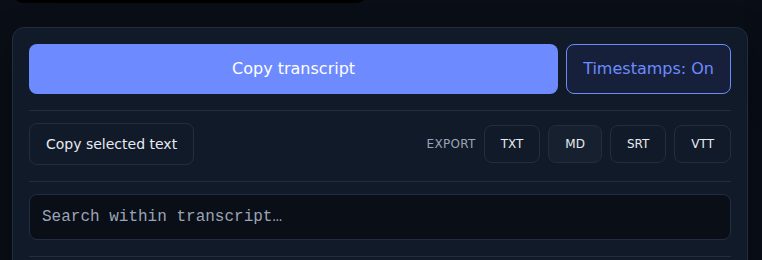
Leave timestamps on for archives. They cost nothing in a text file and they are the way back to the video when a search hit needs its context.
It is one video per paste. There is no playlist import, deliberately: each transcript costs the site a fetch, and a playlist button is how a hundred fetches happen by accident. For a series of forty lectures, that is forty pastes, which sounds worse than it is. At a few seconds each, the whole series takes well under an hour, and most people do it as they watch, one per week.
What to keep in each file
The export is the base. Two additions make it far more useful in a year. First, speaker labels where more than one person talks; captions do not carry them, and a panel discussion without names is hard to search by who said what. Second, your own notes under a heading at the bottom of the file, "## Notes" or similar, kept separate from the transcript so a search hit tells you whether it came from the speaker or from you. Do not edit the transcript text itself beyond fixing obvious caption errors; the value of the archive is that it is what was said.
Naming the files
Everything downstream depends on names you can sort and scan. A pattern that holds up:
Channel or series/
  2024-03-11 - 07 - Attention and transformers.md
  2024-03-18 - 08 - Training at scale.md
Date first, in year-month-day order, so the files sort chronologically. Then the episode or lecture number if the series has one. Then the title, trimmed of the channel's boilerplate. The date is the video's upload date, which you can see on YouTube; the export header carries the date you fetched it, which is different and less useful for ordering.
If the series has no numbers and the dates are not meaningful, drop to title only, but keep one folder per channel. Mixing channels in one folder makes every search noisier.
Searching across the archive
Obsidian. Point a vault at the folder, or drop the folder inside an existing vault. Obsidian's search covers every file, supports phrases in quotes, and shows the matching line with context. The search also covers the header, so "Source:" plus part of a URL finds a file by video. Because each line has a timestamp, a hit tells you the video and the minute in one look.
Notion. Import the Markdown files (Import, then Text & Markdown), one page per file, under a parent page for the channel. Notion's search is across the whole workspace, so give the parent page the channel name and search from inside it. Notion breaks long files into one block per paragraph, which is fine for reading and slightly slower to import for very long talks.
Terminal. If you are comfortable there, grep -rn "phrase" on the folder lists every file and line number containing the phrase, and ripgrep (rg) does the same faster with nicer output. This is the most powerful option because it takes regular expressions: rg -i "gradient (descent|clipping)" finds both in one pass.
Plain search in Finder or Windows Explorer also works for single words, since the files are text.
Combining, when you need one file
Sometimes you want the whole series as one document, to hand to an assistant for a question that spans lectures or to read on a tablet. Concatenate the files in order; on a Mac or Linux, cat *.md > series.md in the folder does it, and the date-first names guarantee the order. Keep the individual files; the combined one is a derived copy.
For an assistant, a full semester is too long for one paste. Combine four or five lectures at a time, ask the question, and note which combined file the answer came from. Each line still carries a timestamp back to its video, so a claim in the answer can be checked against the source in one click.
Keeping it current
The archive goes stale the week you stop adding to it. Two habits prevent that. Keep a plain text file at the top of the folder listing the video URLs you have already exported, one per line; before you paste a link, search that file so you do not fetch the same video twice. And when a new video posts, export it the same day you watch it, while the title and number are in front of you.
If a creator later uploads corrected captions for a video you archived from the automatic track, re-export it. The header's generated date tells you which files are old, and the auto-generated versus uploaded guide covers how to tell which track a file came from.
The rights question
These files are for your own reference. The transcript is the creator's caption text, and an archive of someone's whole channel is exactly the kind of thing that should stay on your disk. Quote from it with a link and a timestamp; do not publish the folder.
Try it on a video
Paste a YouTube link and get a clean, exportable transcript in seconds.