
10 Smart Ways to Use YouTube Transcripts
June 25, 2026 · 7 min read
A video can only be consumed in real time. A transcript turns it into text, and text can be searched, skimmed, quoted, and pasted into whatever you are working in. Here are ten things people do with a YouTube transcript, in rough order of how often they come up, with what each one takes.
1. Skim a long video in a fraction of the time
Reading is three to four times faster than listening. A forty-minute talk is about 6,000 words, a fifteen-minute read at a normal pace and a five-minute skim. On the transcript page, turn the Timestamps toggle off so the text reads as prose, scan for the section you want, and turn timestamps back on when you find it so you can click into the video. Most people who try this once stop watching talks at 2x speed.
2. Quote a source accurately
Researchers, students, and journalists need the exact words. Search the transcript for a distinctive word from the passage, select the lines, and use Copy selected text, which takes the passage exactly as the captions have it with the timestamps attached. Then click the timestamp and listen once, because automatic captions mangle names and numbers. The quoting and citing guide has the APA, MLA, and Chicago formats for a video with a timestamp.
3. Turn a lecture into study notes
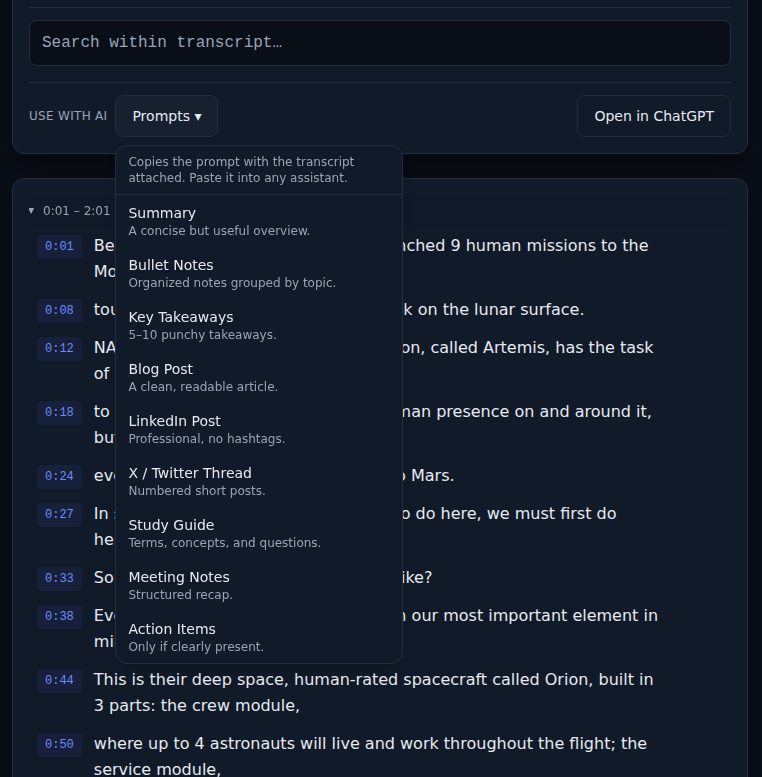
Paste the lecture link, read the transcript once for shape, export it as Markdown, and cut it down to a quarter of its length in your own words; the cutting is the studying. Then use the Study Guide entry in the Prompts menu to get review questions, and answer them from memory. The recorded-lectures guide lays out the three passes and a week's schedule.
4. Write a blog post from a video
A talk, interview, or tutorial has an argument in it, and the transcript is the raw material. List the claims the speaker makes, each with a timestamp, and write from that list rather than from a summary. The Blog Post entry in the Prompts menu gives you a first draft in the right shape; the editing afterward, where you put the speaker's phrasing back and add your own view, is what makes it worth reading. The transcript-to-blog-post guide covers the whole workflow.
5. Draft social posts
One line from a video can carry a LinkedIn post or a thread. Find it with search, copy it with its timestamp, and build the post around the quote with credit and a link to the moment. The LinkedIn Post and X / Twitter Thread prompts draft the surrounding text; keep the speaker's words exact and mark them as a quote.
6. Translate the content
Text translates far better than audio, and the assistant or translation tool you already use will take a transcript pasted in whole. Note that LinkTranscript shows the video's own caption track and does not translate; if the video carries a second caption language, YouTube's caption menu is where to find it. For language learners, the two-track guide turns this into a study method with the timestamps as the alignment.
7. Make the content searchable
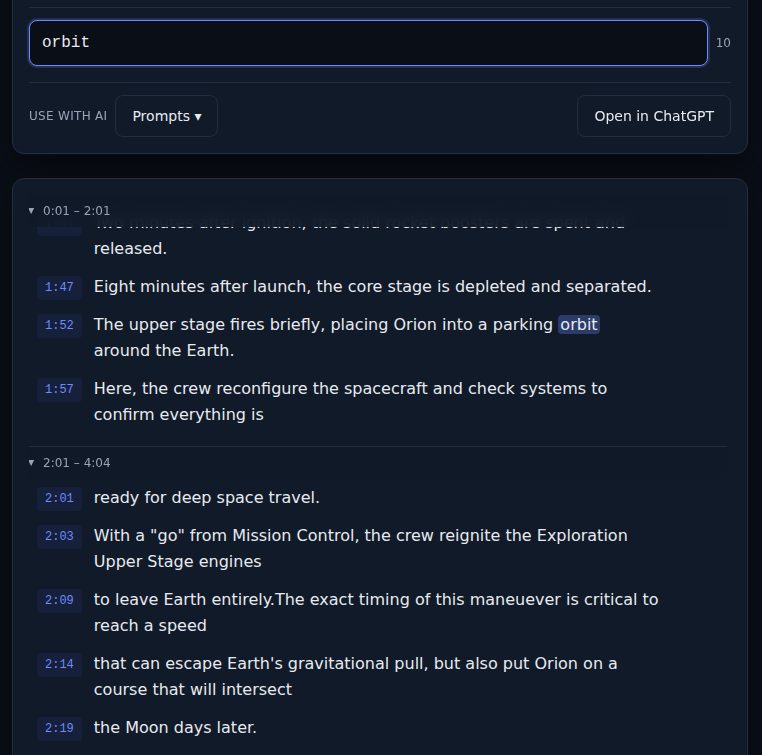
Video is opaque to search. A transcript makes every word findable: type into the search box on the transcript page and the count shows how many times the word occurs, with each match highlighted and one click from the moment in the video. For a whole channel or lecture series, export each video as Markdown into one folder and search across the files in Obsidian, Notion, or a terminal; the searchable-archive guide has the naming scheme that keeps it usable.
8. Create subtitles for your own edits
If you are cutting a clip or embedding a video on a site, export SRT or VTT. Both carry YouTube's own cue timings, so the captions land on the right words. Editors mostly want SRT; web players and course platforms mostly want VTT. The SRT versus VTT guide has the tool-by-tool list and the fixes for offset timing and broken characters.
9. Feed it to an AI assistant
Assistants cannot watch a video, so pasting the link and asking for a summary gets you a confident guess from the title and description. Paste the transcript instead. The Prompts menu copies the transcript with a prompt for a summary, bullet notes, key takeaways, or an outline, and the Open in ChatGPT button copies the transcript and opens a new chat ready for the paste. The guide on using a transcript with ChatGPT, Claude, or Gemini has the four prompts that hold up and the habits that catch a wrong answer.
10. Pull action items from a recorded meeting or webinar
Recorded calls and webinars are full of decisions buried in conversation. The Action Items prompt asks the assistant for only the commitments that are clearly present in the transcript, with nothing invented, and the Meeting Notes prompt gives you a structured recap. Read the result against the transcript before you send it to anyone; search for "will," "by," and "next week" to find the commitments the assistant missed.
One more: check a claim before you share it
The clip in your group chat was cut from something longer. Find the full video, paste its link, search for a word from the claim, and read the thirty seconds before and after; then click the timestamp and listen for tone. The fact-checking guide turns this into a five-minute checklist.
Every one of these starts the same way: copy the link, paste it on the home page, and the words are on the page in a couple of seconds. The example page shows a finished transcript with every control working if you want to see it before pasting your own.
Try it on a video
Paste a YouTube link and get a clean, exportable transcript in seconds.