
From One Talk to a Week of Content, Without the Slop
September 8, 2026 · 7 min read
A forty-minute talk contains more finished thinking than most people write in a month. It also contains forty minutes of throat-clearing, tangents, and "as you can see on this slide." Repurposing is the work of separating the two, and the transcript is the raw material.
Build the spine first
Paste the talk's link on LinkTranscript and read the transcript once with timestamps on. Do not summarize yet. Write down every claim the speaker makes that you would defend in your own words, each with its timestamp. A typical conference talk yields eight to fifteen of these. That list is the spine, and every piece you produce this week is a different cut of it.
Talks lean on slides, and the transcript does not have them. Every "as you can see here" is a gap; note the timestamp, and when you write, either describe what was on the slide in a sentence or link to the deck if the speaker published it. A claim that only makes sense with the chart is a claim you cannot repurpose without the chart.
Then mark three items on the list: the claim that is most surprising, the claim with the best story attached, and the claim most useful to someone in a hurry. Those three become the openings of three different pieces.
One job per format
The failure mode of repurposing is publishing the same summary four times with different line breaks. Each format gets its own job.
The blog post gets the argument. Take the spine in the speaker's order, or a better order if you found one, and write it as prose, with the strongest evidence from the talk quoted with timestamps. Aim for the length the argument needs, usually 800 to 1,500 words. This is the piece the others link to.
The LinkedIn post gets the story. One claim, the one with the anecdote, told in the first person if it is your talk, or with "at a talk last week, [speaker] described..." if it is not. Under 200 words. End on the one-sentence version of the claim rather than a question designed to bait comments.
The thread gets the list. The eight to fifteen claims, one per post, each a complete sentence that stands on its own. The first post says what the talk was and links the video; the last post links the blog post.
The newsletter gets your reaction. Subscribers already saw the talk or do not care; what they want is what you think about it. Two or three paragraphs of your position, one quote from the transcript that changed your mind or made you dig in, and a link.
Let the Prompts menu draft, then edit like you mean it
Under the search box on the transcript page there is a Prompts menu with Blog Post, LinkedIn Post, and X / Twitter Thread entries. Each copies a prompt and the full transcript together, so you paste once into ChatGPT, Claude, or Gemini and get a draft in the right shape. Use them. Then treat the output as a first draft written by someone who was not in the room.
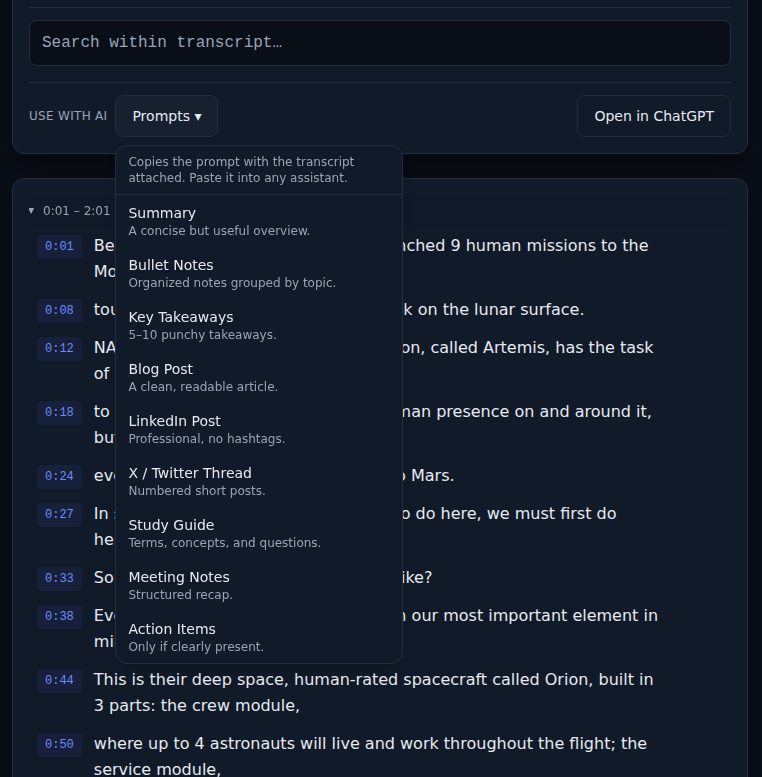
The editing rules that keep a draft from being slop:
- Cut every sentence you cannot trace to the transcript or to your own head. Assistants fill gaps with plausible generalities, so a talk about one company's outage becomes "in today's fast-moving landscape." Delete on sight.
- Put the speaker's phrasing back. Drafts paraphrase everything into the same smooth register. Where the speaker said something sharp, search the transcript, copy the line, and quote it.
- Add what the talk did not have: your disagreement, the counterexample from your own work, the question you would have asked. Nobody else can write that part.
- Check every number and name against the transcript, then against the video by clicking the timestamp. Automatic captions mangle both, and assistants repeat the mangling with confidence.
- Read it aloud. If a paragraph could be about any talk, it is filler.
A week, laid out
Monday: read the transcript, build the spine, publish nothing.
Tuesday: the blog post. Draft from the Blog Post prompt, edit against the rules above, publish.
Wednesday: the thread, linking to the post. The spine list is already most of it.
Thursday: the LinkedIn post with the story.
Friday: the newsletter with your reaction and the links.
Four pieces from one talk, each with a reason to exist. If one of them has nothing to add over the others, skip it.
Whose talk is it
If it is your talk, everything above is yours to use. If it is someone else's, you are writing about a talk, and the rules are the ordinary ones for any published source. Quote with credit and a link to the video. Keep quotations to what makes your point; a post that is mostly the speaker's words with your name on top is a different thing. Never publish the full transcript. And tell the speaker: most are glad someone took the talk seriously enough to write about it, and some will share what you wrote.
The source link belongs in every piece, not only the blog post. It costs nothing, and readers who want the whole talk can go and get it.
A checklist before you hit publish
- Every claim traces to a timestamp or to your own experience.
- At least one sentence is the speaker's exact words, quoted, with the time.
- At least one paragraph is yours alone and could not have come from the transcript.
- Names and numbers checked against the video, not only the captions.
- Credit and link to the talk in the piece itself, not in a footnote.
Try it on a video
Paste a YouTube link and get a clean, exportable transcript in seconds.