
How to Fact-Check a YouTube Video Before You Share It
September 8, 2026 · 6 min read
A clip lands in your group chat. Forty seconds of someone saying something outrageous, with a caption telling you what to think about it. Before you forward it, five minutes with the full video's transcript will tell you whether the clip is fair, and often whether the claim is true.
Find the full video and get its transcript
Clips are usually cut from something longer. Search YouTube for a distinctive phrase from the clip in quotes, or for the speaker's name and the topic; the full video is often an interview, a hearing, a lecture, or a stream. Paste that link on LinkTranscript. Leave timestamps on.
If the only version that exists is the clip itself, the transcript still helps with the steps below about numbers and sources, but you cannot check the context, and that is worth saying when you share.
Search for the claim and read around it
Type a word from the claim into the search box under the toolbar. Choose an ordinary word: automatic captions get common vocabulary right and names, brands, and figures wrong, so search "immigration" rather than a surname and "billion" rather than a specific number. The count and the highlighted lines show every place the word came up.
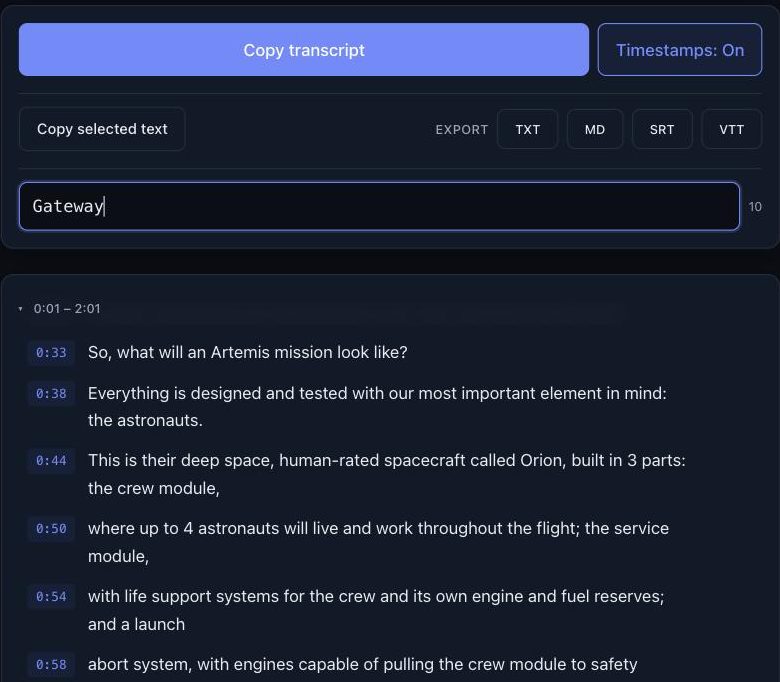
Find the line from the clip, then read the thirty seconds before it and the thirty seconds after. This is where most misleading clips fall apart: the speaker was quoting someone else, setting up a position to argue against, answering a different question than the caption implies, or joking. A transcript shows you the setup and the follow-through that a clip cuts off.
Hear it
Click the timestamp on the line. The player jumps to that second. Listen to the passage once, because tone does not survive transcription: sarcasm reads as sincerity, a rhetorical question reads as a claim, and a hesitant "I think maybe" arrives as a flat assertion. Thirty seconds of audio settles what the text cannot.
Compare the clip's captions to the real ones
Two things go wrong at this stage, and the transcript helps with one of them.
The first is that the captions are wrong. Automatic captions drop "not," turn fifteen into fifty, and spell names by sound. Burned-in captions on a clip can be wrong on purpose. If the clip's caption text and the transcript disagree, or a number seems off by an order of magnitude, listen at the timestamp and trust your ears. An uploaded caption track, if the video has one, was corrected by a person, and you can tell which kind you have from the punctuation: automatic tracks have almost none.
The second is that the speaker is wrong, and no transcript fixes that. But the transcript tells you what to check. Search for "according to," "study," "report," "data," and "percent"; the hits are where the speaker cited something. Note what they named. Then find that source yourself with a search engine, not with an assistant, since an assistant will happily confirm a study that does not exist. If the speaker cited nothing, the claim is an opinion, and you can share it as one.
Check the date, too
A true clip from 2019 shared as if it were last week is the other common trick, and the transcript does not carry the upload date. It is on the YouTube page under the video. Search the transcript for "this year," "last week," "yesterday," or any year the speaker mentions to anchor when they were speaking; a speaker who says "the current administration" meant a specific one at the time. Add the date when you share, so the next person does not have to find it.
What a transcript cannot tell you
It cannot show you the chart the speaker pointed at, the document held up to the camera, or the edit between two sentences recorded an hour apart. For a video where the visuals carry the claim, watch that part. It also cannot tell you whether the video itself is authentic; a transcript of a fabricated video is a faithful record of a fabrication. For anything consequential, find the original upload on the speaker's own channel or the event's, and compare.
Reply with the receipt
If the claim survives, share it with a link that starts at the moment. A YouTube URL with ?t= and the number of seconds (or &t= if the URL already has a question mark) opens the video right there; the transcript timestamp gives you the minute and second, and 12:40 is 760 seconds. The next person can check in thirty seconds instead of five minutes.
If the claim does not survive, you have the timestamp of the moment that shows why. "At 12:40 he says the opposite, here is the link" gets further than "that's fake," and it takes one line to write. Each transcript line has a copy control on hover that takes the sentence with its timestamp, so the quote is a paste away.
The five-minute checklist
- Find the full video, not the clip, and paste its link.
- Search an ordinary word from the claim; read thirty seconds either side.
- Click the timestamp and listen for tone.
- Compare the clip's caption text to the transcript; listen wherever they disagree.
- Search "according to," "study," "report," and "percent," and go find the source named.
Most clips do not need all five. A clip that fails at step two, because the setup was cut off, is the common case, and it takes about ninety seconds to find out.
Try it on a video
Paste a YouTube link and get a clean, exportable transcript in seconds.